VERIZON | CLOUD
Verizon continually updated and improved the Verizon Cloud experience to increase engagement and gain more users.
UX Design Process
Working with a team of visual designers and UX researchers, we enhanced the Verizon Cloud experience.
Analyzed the current website, including a review of current features here
Created prototypes for user testing
Reviewed results from testing, implemented changes, and worked to develop the changes
Wireframe design and created deliverables for the dev team seen here
Understood the business needs from a Verizon Cloud perspective and created a roadmap of future features
The Cloud website needed a redesign to be more usable, user-friendly, and an everyday tool for the customers. After doing some research and testing, we decided the goal for Cloud was to create a ‘destination’ experience.
Hero carousel brings photos to life
Major features of the Cloud include printing photos, music, and contacts.
The Fujifilm section encourages the user to purchase prints,

SUB-NAVIGATION DESIGN
Within the Cloud sub-pages, we combined Photos & Videos.
Adding subcategories, such as photos, videos, albums, and favorites, creates a system to filter the users' images more easily
Moving the sub-pages to the left panel makes this page easier to navigate and browse
Using portrait and landscape images encourages users to stay on the page longer
Surfacing 'Favorites' and 'Sharing' beneath each photo encourages more interactions
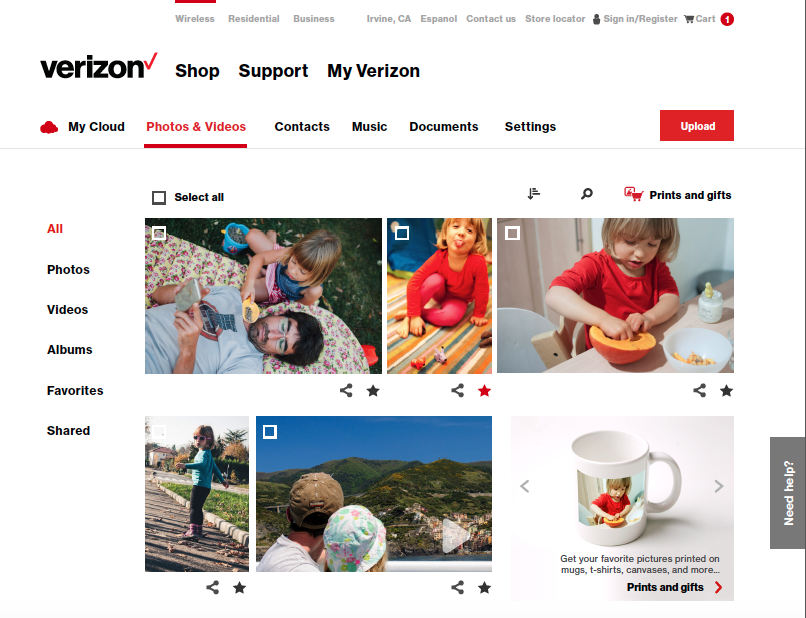
Photo and Video Detail Pages
Annotated wireframes
Full visual design
